

Paying for people just to view reports
Someone who opens one report a month still needs a full paid seat to see it.
Enterprise reporting portal
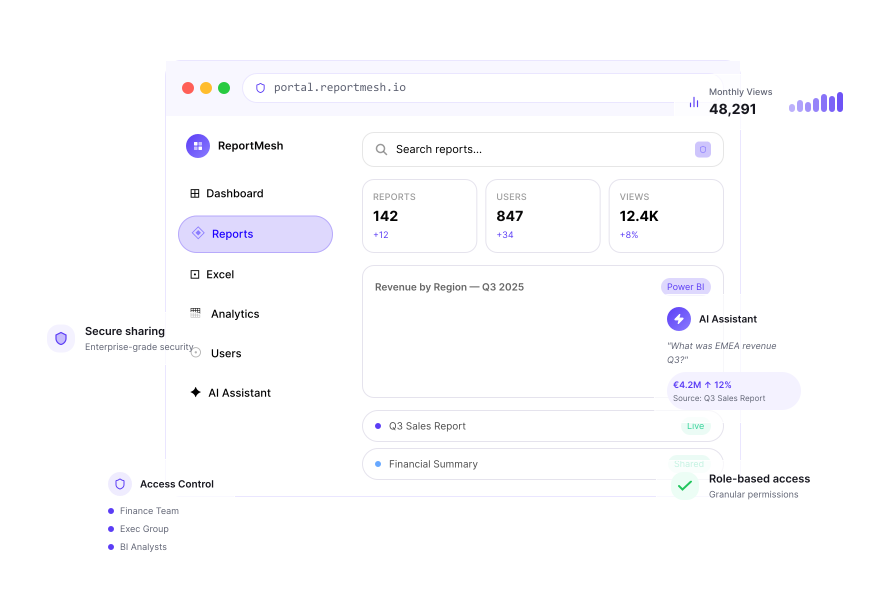
ReportMesh brings your Power BI reports and Excel spreadsheets together in one secure portal, so everyone finds exactly what they need while you stay in complete control of access. No viewer licences. No scattered reports. No security compromises.
A BETTER WAY TO DISTRIBUTE REPORTING
Your reports are already built. ReportMesh gives people one secure place to find the right one.
It sits in front of the Power BI reports and spreadsheets you already have, with one sign-in and access that is clear and controlled.
Nothing is rebuilt or copied. Your data stays where it is, on infrastructure you control.
Explore the productTHE DISTRIBUTION PROBLEM
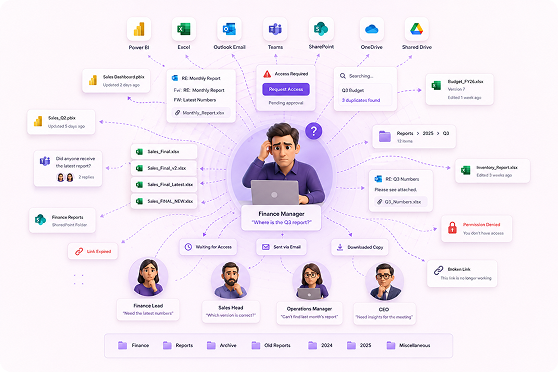
Reporting work rarely fails because the analysis was wrong. It fails quietly, in the gap between a finished report and the person who needed it.
Someone who opens one report a month still needs a full paid seat to see it.
Old links, forwarded files and one-off exceptions pile up until no one can give a straight answer.
Dashboards live in one place, spreadsheets in another, and people open last month's version.
Without usage figures, there is no way to tell which reports to retire.
Old shared links, forgotten email attachments, and stale permissions silently expose sensitive business data over time.
ONE SIMPLE SYSTEM
Six capabilities, all working the same way. Whichever kind of file someone opens, there is only one set of rules to learn.
People sign in with the work account they already use. Your existing joiner and leaver process carries straight through.
Give people the full interactive experience - filtering, drilling in, exploring - without a paid reporting licence of their own.
Open view-only spreadsheets with charts, formatting, formulas and every tab intact. The source always stays where it is.
See exactly who can open something, why they have access and remove it in one click. Unshared content is genuinely invisible.
Know who opened what, how often and what has gone untouched - so you can prove value and retire what no longer earns its keep.
Fabric capacity automatically suspends when idle and resumes on demand, giving you direct control over your infrastructure spend.
LIVE IN DAYS, NOT MONTHS
We connect ReportMesh to the reports and spreadsheets you already have. You choose who sees each item; we give them a front door that feels like yours.
See it against your reportsA one-off setup connects ReportMesh to the reports and spreadsheets you already have. We handle this part with you; there is nothing for your team to build.
Add your reports and spreadsheets to the library. At this point nobody can see them - not even by accident.
Choose who gets to see each item. Sharing is the only way anything becomes visible, and every share is recorded with who did it and when.
Watch what people actually open. Show the reporting that earns its keep and retire what nobody has touched in months.
ACCESS THAT HOLDS UP TO QUESTIONS
Being in charge of the portal does not quietly make someone a reader of every report inside it. Administrators can give themselves access if they genuinely need it — and that decision is recorded like anyone else’s.
Ask us to show youAsk a question about a report in plain English. Every answer is worked out from live figures and shows exactly where it came from.
Driven by an uplift in Enterprise accounts.
View report sourcesNO BLACK BOXES
Question-asking is off until you turn it on. You choose the people and reports, and the underlying data is never copied or moved to a service you did not choose.
WHERE IT RUNS
ReportMesh fits into the environment you have already chosen, rather than creating another platform to secure and approve.
ReportMesh runs on infrastructure you own, under the controls you already use. Your reports remain exactly where they are.
BUILT FOR THE PEOPLE BEHIND THE NUMBERS
Publish once and stop fielding ‘can you send me that report?’ emails.
One way in, protected the same way as everything else you run.
The spreadsheet everyone relies on, always current and in one place.
Give clients a professional, branded reporting experience.
One place to find the numbers, and a way to ask a follow-up.
Fewer licences to buy and proof of what is actually being used.
WHY REPORTMESH
Power BI reports and Excel spreadsheets in one place, shared and measured the same way.
Remove the cost of a seat for every person who only ever reads.
Counts, trends and a list of what nobody opens — so you know what to retire.
Your infrastructure, your controls and your existing security review.
Not a trail of sharing links and exceptions - one clear list per report of exactly who can open it and why.
Every AI answer comes with the reasoning behind it, because a number you cannot verify is a number you cannot forward.
QUESTIONS, ANSWERED
Need a specific answer about how ReportMesh would work in your environment? Talk to the team.
No. The licensing sits with the platform rather than with each person looking at a report, which is where most of the saving comes from. For spreadsheets, people need the standard office software your organisation almost certainly already pays for.
Nowhere new. Reports and spreadsheets stay where they already live and are shown straight to the person viewing them - ReportMesh keeps no copy. The one exception is the question-asking feature, and even then the work happens on your own infrastructure. Leave that feature off and nothing moves at all.
They see a plain you do not have access page. Anything not shared with them never appears in their list either - it is genuinely absent for them, not just tucked out of sight.
Partly, and it is worth being straight about it. Inside ReportMesh the view is read-only. But whether a file can be downloaded is ultimately decided by the settings on the system where that file is stored, not by us. If those settings are open, a determined person can still reach the file directly. We will show you how to close that off.
Counts of who opened what are exact. Time spent is a good estimate rather than a stopwatch - if someone closes their laptop mid-report there is no way to know precisely when they stopped reading. Treat the time figures as a strong signal, not an exact measure.
Days rather than months. The connection work is a one-off task we handle with you, and adding reports takes minutes each. Most of the elapsed time is your own approvals, not our build.
Yes. The portal carries your name, your logo and your colours, so it reads as your reporting rather than someone else's software. This matters most when clients are the audience.
SEE IT AGAINST YOUR OWN REPORTS
The demo worth having uses one of your own reports and one of your own spreadsheets. We’ll answer it in front of you.