

One place to find every report
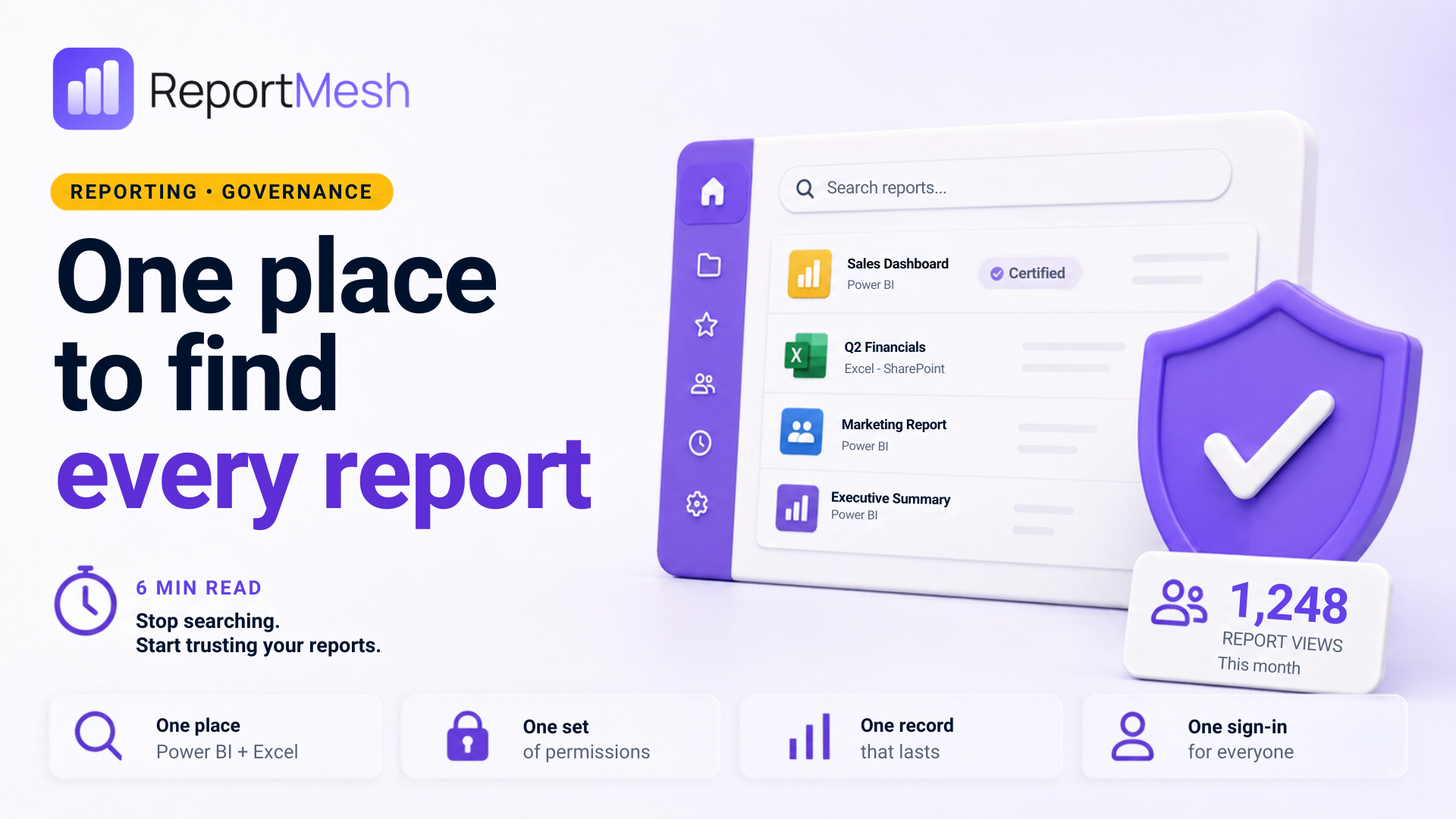
Ask three people in your organisation where the monthly sales report is. You will get three different links, and at least one will be a spreadsheet attached to an email from March.
Nobody chose this. It built up one sensible decision at a time.
The problem
Your reports are spread across four places, and each works differently:
| Where it lives | Why it ended up there | Who can open it |
|---|---|---|
| Power BI | It's a dashboard | Whoever has a licence |
| SharePoint | Finance works in Excel | Whoever has the folder |
| Teams | Someone asked in the chat | Whoever's in the channel |
| Email attachment | The client couldn't open the others | Anyone it was ever forwarded to |
Four places, four sets of rules about who gets in, four people maintaining them. That leads to four problems.
1. Nobody knows which copy is right
The version people act on is whichever they found first. Usually the attachment: it's sitting in their inbox and needs no permission to open.
An emailed spreadsheet is a photograph of the numbers on the day it was sent. It doesn't update. It doesn't tell the reader it's out of date. It just quietly stops being true.
Want to know if this is you? Ask three colleagues for last month's figures and see whether the numbers match.
2. Access is easy to give and almost impossible to review
Every one of those four places has its own way of granting access, managed by a different person. Nobody manages the whole set.
The predictable result: someone leaves, three of their four routes get closed, and nobody notices the fourth.
3. The record of who looked doesn't last
Microsoft does keep a record (that part is often told wrong). The catch is how long, and who can reach it:
- The Power BI part is deleted after 28 days. Gone, unless someone set up an export in advance.
- The rest lasts six months, or a year if you pay for the top Microsoft licence tier, and anyone outside your organisation drops to six months regardless.
- Looking it up needs high-level IT access that the person asking almost never has.
So "who saw this figure, and when?" is usually answerable for a few weeks and awkward after that. For the emailed spreadsheet, there's no record at all.
4. The obvious fix makes it worse
Power BI can email reports on a schedule. But every recipient still needs a paid licence, they get a flat picture rather than the real report, and there's no record of who received it.
Which is exactly why people fall back on attachments, and the cycle starts again.
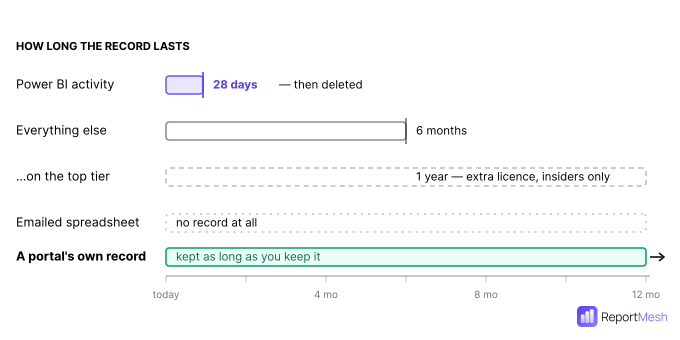
Microsoft does keep the record. The question is whether it's still there when someone asks.
Why it happens
Here's the root cause, and it's simpler than it looks.
In each of those systems, access is built into the storage. A report has to be inside Power BI before you can grant Power BI access to it. Inside SharePoint before you can grant SharePoint access.
So every time a new audience needs a report, someone makes a new copy in a new place, with new Permissions and a new licence question attached.
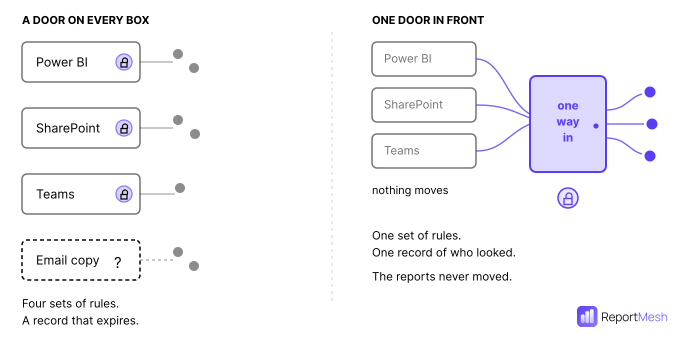
The scattering isn't the disease. It's the symptom of storing and sharing being the same decision.
What you can do about it
Separate the two. Put one front door in front of everything, and leave the reports where they already are.
What that gets you:
- One place to look. Power BI reports and Excel workbooks in a single list.
- One set of permissions. Granted per report, in one place, in language you can actually read.
- One record of who opened what: kept as long as you want it, not 28 days.
- One sign-in, including for outsiders. Clients and contractors get in without a Microsoft account, a licence, or an account in your staff directory.
That last point is the one that ends the attachment habit. People email spreadsheets because it's the only thing someone without a licence can open. Give that person a live report they can open themselves and nobody needs to make a copy.
At $14 per person per month as of August 2026, "just buy everyone a licence" was never going to be the answer for an audience of any size. That's why the attachment kept winning.
A permission model you can read in one screen is one you can actually review.
Before you buy anything: Microsoft may have you covered
If your organisation runs Microsoft Fabric, part of this is already solved and it's worth checking before you spend money.
Fabric's catalogue lets you search across workspaces and mark the official version of a report as "Certified", which is a direct answer to which copy is right. It costs nothing extra if you have Fabric.
Where it helps:
- Finding Power BI reports across workspaces
- Flagging the authoritative version
- People inside your organisation with a Fabric licence
Where it stops:
- It only covers Power BI content. Your SharePoint spreadsheets (the ones actually getting emailed around) don't appear in it at all.
- It's for insiders only. It does nothing for the client or contractor outside your organisation, who is the exact person the attachment exists for.
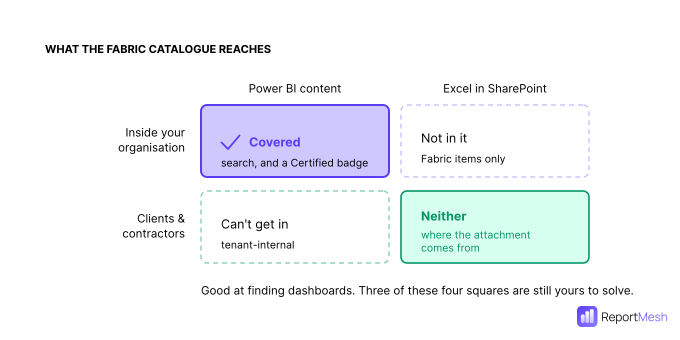
So: if your problem is analysts not finding dashboards, look at Fabric's catalogue first. If your problem includes spreadsheets, or people outside your organisation, it only covers half.
What a portal doesn't fix
Being straight about this, because it's usually oversold.
| What genuinely changes | What's still your job |
|---|---|
| One place to search, covering Power BI and Excel | The mess underneath: one entrance isn't one home |
| One set of permissions you can review | Four near-identical sales reports still need merging by a human |
| A usage record that outlives Microsoft's 28 days | Closing the old routes |
| Outsiders get live reports instead of attachments | Someone owning the list so it stays current |
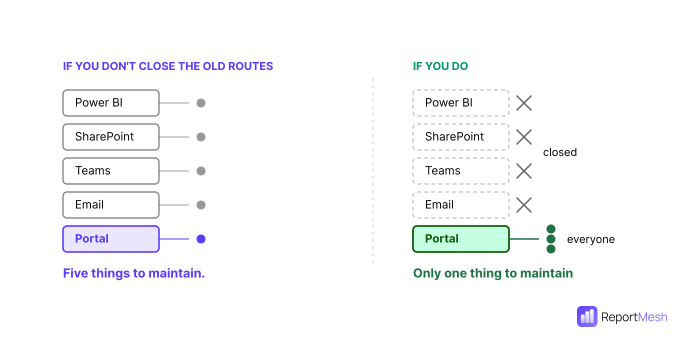
The one that matters most is closing the old routes.
A portal that doesn't replace the old ways hasn't centralised anything; it's just added a fifth place. This is the well-documented way portal projects fail: people carry on as before, and IT ends up maintaining the new thing and all the old ones.
If the SharePoint folder still works, some people will keep using it. That part is a decision your organisation makes, not something any product does for you.
Stale and duplicate reports don't vanish either. They become visible (usage data shows you what nobody has opened in six months), but seeing the clutter isn't clearing it.
None of which is an argument against doing it. It's an argument for expecting the right thing: a portal fixes how people get to reports, provided you let it. That's worth doing on its own.
Where ReportMesh fits
ReportMesh is that front door.
- Power BI reports and Excel workbooks sit together in one branded portal
- Spreadsheets stay in SharePoint and open with everything intact: charts, formatting, multiple sheets
- Nothing is copied, moved or rebuilt
- Staff sign in with their normal work account; clients and contractors sign in without a Microsoft account, a licence, or a place in your staff directory
- You choose who sees what, report by report
- You can see who opened what and how often: included as standard, not a premium extra
On that last point, the honest version: Microsoft keeps this information too, it just throws the Power BI part away after 28 days. A portal keeping its own record still has the history when someone asks about it eight months later, which is generally when they ask.
The reports stay where they are. What changes is that there's one way in, and one record of who used it.
Book a demo if that sounds like your problem.
Power BI pricing quoted is Microsoft list price as of August 2026 and excludes tax. Licensing terms change; check current pricing before making a purchasing decision.