

What Power BI's price rise actually costs you
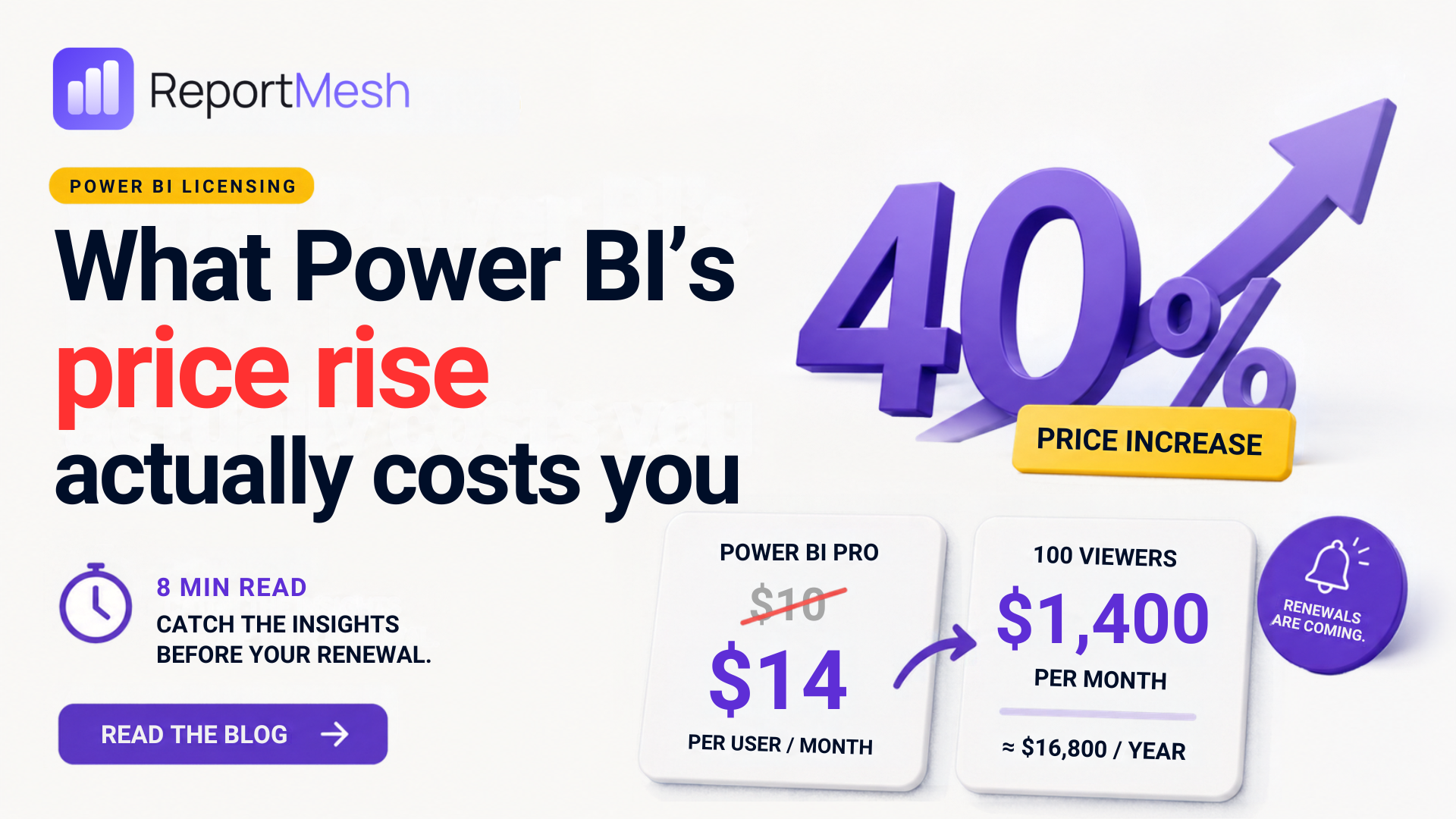
Microsoft raised Power BI Pro by 40%. If you only share reports with your own staff, you will barely notice. If you share them with anyone else, the maths gets ugly fast.
Most people found out the way you find out about a rent increase: not when it was announced, but when the renewal landed. In April 2025 Microsoft put Power BI Pro up from $10 to $14 per user per month, a 40% jump, and the first price rise in nearly a decade. Premium Per User went from $20 to $24 in the same breath.
Existing customers kept the old price until their contract came up for renewal. No phasing, no gentle glide path: just the old number until your renewal date, and the new one after it. Which means a good number of organisations have not felt this yet, and will.
For a team of twenty, it is an irritation. A rounding error on a departmental budget. But if you send reports to people outside your own payroll (clients, franchisees, contractors, the board of a partner organisation), then this is not an irritation. It is a structural problem with your reporting model, and it is much better discovered before the renewal quote than after it.
Let's do the arithmetic
Power BI's per-user model is refreshingly simple to understand and brutally simple to project. Everyone who opens a report needs a licence. At $14 a head per month, here is what that looks like as your audience grows.
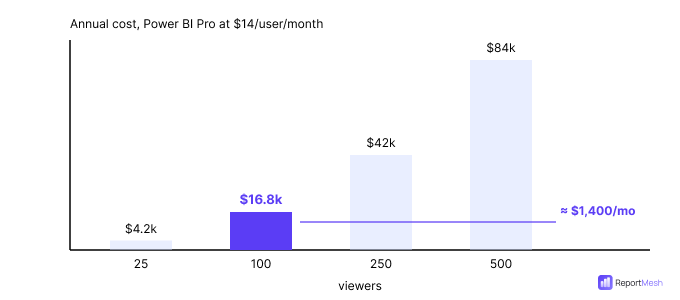
The same licence, four different audiences. Nothing about the product changes as you move right, only the number of people allowed to look at it.
| Viewers | Per month | Per year |
|---|---|---|
| 25 | $350 | $4,200 |
| 100 | $1,400 | $16,800 |
| 250 | $3,500 | $42,000 |
| 500 | $7,000 | $84,000 |
The row worth sitting with is the highlighted one. A hundred external viewers costs about $1,400 a month, and that is before anyone has spent a single afternoon administering guest accounts, and before the first of those hundred people emails to say they cannot log in.
Two things that might save you
- Microsoft 365 E5 and Office 365 E5 annual subscriptions with annual billing include Power BI Pro, and were exempt from the rise. If your staff are on E5, their licences are already covered.
- Your current contract holds the old price until renewal, so you have a known date to plan against rather than a surprise on the next invoice.
Neither helps with the expensive case, which is people who do not work for you.
Why external sharing is where it breaks
Power BI was built for sharing inside a company, and inside a company it works well. Everyone lives in the same directory, everyone has a licence, and sharing is a permissions question.
Step outside that boundary and every assumption fails at once. Sharing a report with a client means that client needs a licence. Depending on how you do it, they also need a guest account in your directory, the same directory that governs access to everything else your organisation owns. So you are now paying per external viewer and administering identities for people you do not employ, in your most security-sensitive system.
The real cost is not the $1,400. It is the reports you quietly decide not to share.
Because that is what actually happens. The cost stops being a line item and starts being a reason to say no. The client who gets a PDF once a month instead of the live dashboard. The partner who emails to ask for numbers you would have been glad to show them. The regional manager working from a spreadsheet someone exported in March. None of that appears on an invoice, which is precisely why it persists.
The other way to buy Power BI
There is a second licensing model, and it is the one every reporting portal on the market is built on. Instead of paying per viewer, you pay for capacity, a fixed lump of compute that serves reports to as many people as you care to point at it.
The mechanism matters, so here it is plainly. Rather than each person carrying their own licence to Power BI's front door, an application holds the licensing on everyone's behalf and serves the reports onward. The industry calls it app-owns-data embedding. What it means for your invoice is that the number of viewers stops appearing on it.
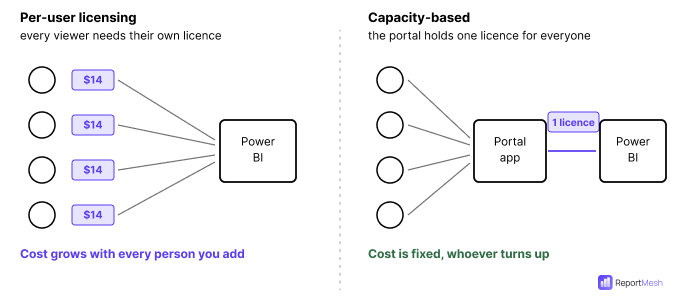
The only structural difference: who holds the licence. On the left it is four people; on the right it is one application. Add a fifth viewer to each side and only the left-hand invoice moves.
You are trading a per-person cost for a fixed one, so the whole decision reduces to a single question: where do the two lines cross? The answer, roughly, is 30 viewers.
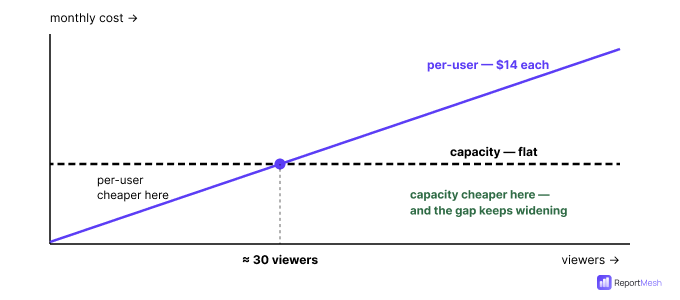
Below roughly 30 viewers, per-user licensing is cheaper and simpler (genuinely the right choice). Above it, every extra viewer is effectively free on capacity and another $14 a month on Pro.
At 100 viewers the comparison is uncomfortable. At 500 it stops being a comparison and becomes an explanation you have to give your finance director.
One trap when you buy capacity
Capacity comes in two purchasing models that look similar on a pricing page and behave nothing alike:
- Pay-as-you-go bills per minute while the capacity runs, and can be paused when nobody is using it.
- Reserved commits you for a year at around 40.5% below pay-as-you-go, but bills whether the capacity is running or not. You cannot pause your way out of a reservation, and scaling below your reserved level will not reduce the bill either.
If your reporting is genuinely read around the clock, take the reservation and the 40.5%. If it is read during office hours and sits idle every night and weekend, model pay-as-you-go before you sign. A year is a long time to be on the wrong one.
What this does not fix
Capacity licensing solves the per-viewer cost. It is not a free lunch, and anyone telling you otherwise is selling something:
- Someone still has to control access. Take licences away as the gate and access control rests entirely on your application. That is an improvement (a licence was never a permission model), but it is real work that has to be done properly.
- Capacity has to be sized. Too small and reports crawl under load. Too large and you have swapped a per-user bill for an oversized fixed one.
- It is not automatically cheaper. Below about 30 viewers, per-user licensing may well remain the right answer. This is a threshold, not an upgrade.
Where ReportMesh fits
ReportMesh is a reporting portal built on exactly this model. Your Power BI reports (and the Excel workbooks everyone actually relies on) are published through one branded portal, and viewers do not need a paid Power BI licence to open them.
Staff sign in with the work account they already have. External users (clients, partners, contractors) sign in without a Microsoft account, without a licence, and without a guest invitation into your staff directory. You decide who sees which report, and you can see who actually opened what. The reports themselves stay exactly where they are: nothing is rebuilt, nothing is copied.
Book a demo to see how ReportMesh eliminates per-viewer Power BI licensing costs for your organization.